Wan 2.2 motion prompts: how to describe movement so the clip looks natural
Write Wan 2.2 image to video prompts that move naturally: describe the motion, not the person. Tested prompts for smiles, sea breeze, walks and hair flips.
The first Wan 2.2 prompt most people write looks like an image prompt. Something like “beautiful Indian woman, long wavy black hair, white linen dress, beach at sunset, cinematic, 4k”. Then they’re surprised when the clip barely moves, or the face slowly turns into someone else.
The image already did that job. In image to video, Wan sees your picture as frame one. It knows who she is, what she wears and where she’s standing. What it doesn’t know is what happens next. That’s the only thing your prompt needs to say.
This post is the prompt side of workflow 03 in the AI Character Kit. The settings (fp8 models, 4 step LoRAs, 480 x 832, 81 frames) are in Wan 2.2 image to video settings that work on 24 GB. Here I’ll stick to words.
Why does describing the person make the clip worse?
Two reasons, and I’ve hit both.
First, you’re spending the prompt on stuff the model can already see. If half your prompt is hair colour and outfit, the motion gets less weight, and you get a clip where she sort of breathes and blinks and that’s it.
Second, your description can fight the image. Say “blonde” when the picture shows dark hair and the model has to pick a side. Sometimes it picks the text, and you watch her hair shift colour over 5 seconds.
So the rule is simple. Describe movement, not the person. Nouns about her appearance can go. Verbs stay.
What’s the formula?
This is the one from the kit guide, and I still use it almost every time:
[what she does], [what moves around her], [camera], natural motionFour slots. You don’t have to fill all of them, but each one does something different.
- What she does is the main action. Keep it to one or two verbs.
- What moves around her gives the background life: waves, steam, rain, leaves. A clip where only the person moves and everything else is frozen looks like a cutout.
- Camera tells Wan how the shot itself behaves. “Handheld phone camera” gives that slight UGC wobble. “Slow dolly in” feels cinematic. “Camera stays still” is useful when you want the motion to read clearly.
- “natural motion” at the end is a small thing. It’s there to nudge the pacing toward real speed instead of that floaty slow motion look.
What does a good prompt look like in practice?
Here’s a beach clip from the kit’s samples. The source was a still of Aanya (a fictional character) standing on the sand at golden hour. The clip is the standard 480 x 832, 81 frames at 16 fps, so about 5 seconds.
A prompt in this style looks like:
She walks slowly toward the camera, looking at the lens, background slightly
blurred, steady tracking shot
Notice what isn’t there. No dress, no hair colour, no “beautiful”. Just the walk, where she looks and how the camera follows. The waves and the light come from the image for free.
One caveat: “slowly” matters. Fast leg movement is where Wan tends to tangle feet, and a slow walk is easy to speed up in an editor later.
Which prompts work reliably?
These are from the motion section of the kit’s prompt library. I’ve sorted them by how often they work first try for me, which is a feel thing, not a measured success rate.
Very reliable
She turns her head toward the camera and smiles softly, hair moving gently,
handheld phone camera, natural motion
She looks out at the sea, then turns and smiles, hair moving in the sea breeze,
waves rolling behind her, handheld phone cameraShe lifts the cup and takes a sip, then smiles at the camera, steam rising,
natural motionThe soft smile is my default first test for any new character. If the face holds up through a head turn and a smile, it’ll hold up through most things.
Usually fine, sometimes needs a reroll
She flips her hair over her shoulder and laughs, natural motion, handheld cameraShe waves at the camera and says hi, natural hand movement, handheld phone videoHair flips are lovely when they land. When they don’t, a strand turns into a smear for a few frames. Waves involve a hand moving fast near the face, so expect the odd extra finger. A new seed fixes it more often than a rewrite does.
Good for mood
She looks up at the rain and smiles, raindrops falling, neon lights flickering,
slow camera push in
Here’s a neon version of the same character with a slow turn and smile. Four frames across the 5 seconds:
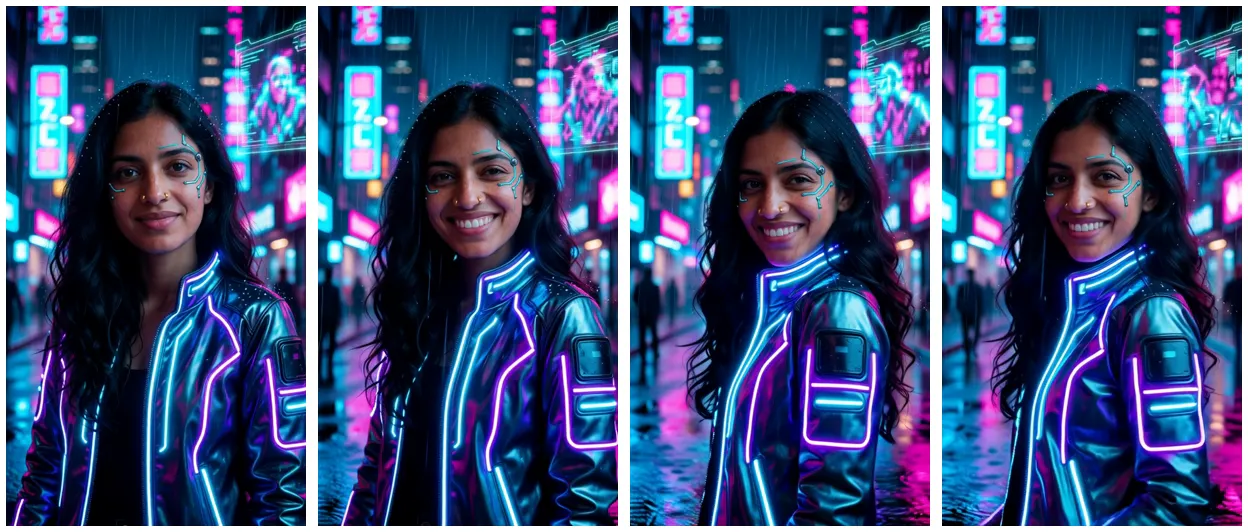
The motion is small. That’s on purpose. The rain and the flicker do a lot of the work, so she doesn’t have to.
How much motion can you ask for in 5 seconds?
Less than you think. At 16 fps you get 81 frames, and Wan has to keep the face, hands and clothes consistent through every one of them. A head turn plus a smile is easy. A head turn, a smile, a wave, a step forward and a hair flip is five things competing, and the model will rush or blend them.
My rough rule is one main action plus one small one. “Turns and smiles.” “Sips and looks up.” “Walks forward, glances at the lens.” If I want more, I split it into two clips (more on that in making longer AI videos in ComfyUI).
Here’s a selfie style clip where the motion stays modest: a smile, a little hair touch, a small hand gesture.
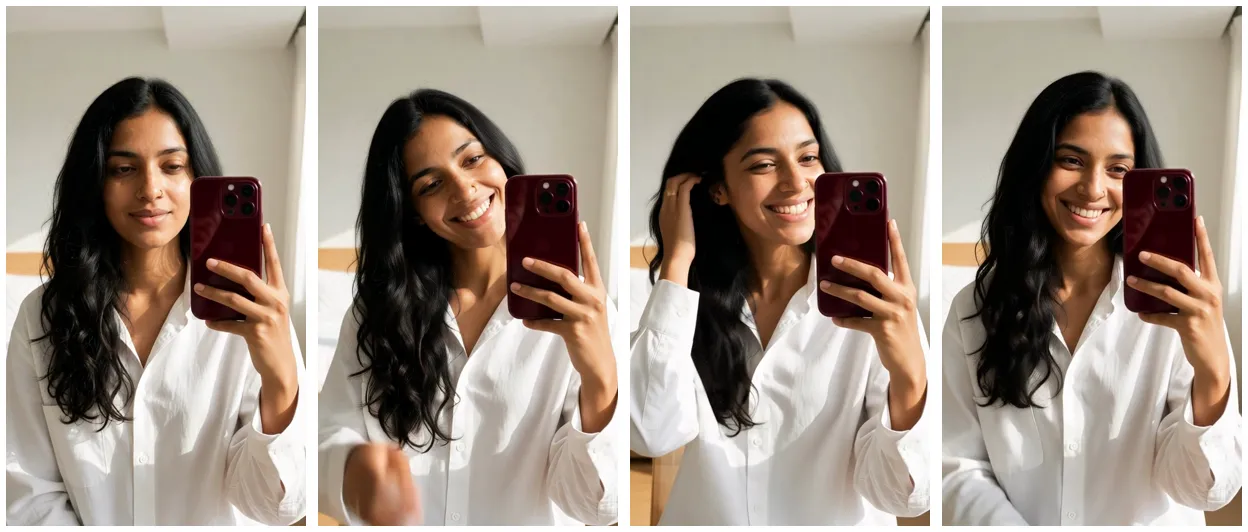
A prompt like “She holds the phone and talks to the camera, small head movements, blinking naturally, vlog style” sits in this range. It reads as a person, not a performance.
Does word order matter?
A bit. I put the main action first and camera notes near the end. Lead with “handheld phone camera, slow zoom” and the camera move tends to take over. And use plain verbs. “Turns”, “smiles”, “walks”, “lifts”, “laughs”. Fancy phrasing (“gracefully pivots with an enigmatic expression”) doesn’t help, and sometimes it adds weird stuff to the face.
Should you touch the negative prompt?
No. Workflow 03 ships with the official Wan negative prompt, in Chinese because that’s what the model was trained with (the Wan2.2-I2V-A14B model card has the background). Adding “bad hands, deformed” in English won’t fix hands. If something keeps going wrong, the fix is usually in the motion prompt or the source image, and fixing common Wan 2.2 video problems goes through those one by one.
What about the camera, specifically?
Pick one camera behaviour per clip. Ones I’ve had good luck with:
| Camera phrase | What you get |
|---|---|
| handheld phone camera | Slight shake, feels like UGC |
| camera stays still | Locked off, motion reads clearly |
| slow dolly in / slow camera push in | Gentle move toward the face |
| steady tracking shot | Camera follows a walk |
“Orbit around her” and fast pans are worth avoiding at this length. The background has to be invented as the camera moves, and that’s where things get mushy.
A quick checklist before you press Run
Cut every word about her looks, keep one main action, give the background something to do, and use one camera phrase. Then check the image is portrait if the video is portrait. That last one isn’t a prompt thing, but it ruins more clips than bad prompts do.
On an RTX 3090 Ti, each try at these settings takes about 2 minutes once the models are loaded, so it’s cheap to run two or three seeds and keep the best.
If you’d rather start from prompts that are already tested, the AI Character Kit has workflow 03 set up with these settings and its ten tested motion prompts, including the ones above, ready to paste.