The character prompt formula: how to describe an AI person so she stays recognizable
A slot by slot prompt formula for a fictional AI character: age, hair, unique marks, skin and outfit, so the face holds up in every scene and edit later.
Here’s a test I like. Look at your AI character for five seconds, close the image, and describe her to someone out loud. If all you can say is “pretty, dark hair, early twenties”, she isn’t a character yet. She’s a stock photo, and the model will happily swap her for another stock photo the moment you change the scene.
A recognizable character has handles: things you can name and spot. The prompt is where you build those handles. This post walks through the formula used in the AI Character Kit, slot by slot, with the reasoning behind each one.
Why do most character prompts make a different person every time?
Because they describe a category, not a person. “Beautiful Korean woman with long black hair” matches a huge number of faces, and the model picks a fresh one on every seed.
Words alone can’t fully fix that. Text to image models have no memory, so even a perfect prompt drifts once you move her to a beach. So the kit uses words to build one great base image, then an edit model to carry that face into new scenes. The full method is in how to keep the same face without LoRA training.
But the prompt still decides two big things. It decides whether the base image is worth copying at all, and which details you’ll name again in every edit prompt afterward.
What goes into the formula?
This is the structure, written for Krea 2 Turbo:
[photo type] of [name], a [age]-year-old [ethnicity] [woman/man] with [hair],
[eyes], [one or two unique marks], [skin detail], wearing [simple outfit],
[place] in [light], [camera detail]
And here’s Seo-yeon, one of the fictional sample characters:
candid phone photo of Seo-yeon, a 22-year-old Korean woman with long straight
black hair tied half-up with a red ribbon, soft natural makeup, wearing a
traditional hanbok with a pastel pink jeogori jacket and deep red skirt, standing
in a sunny hanok courtyard, natural skin texture, soft daylight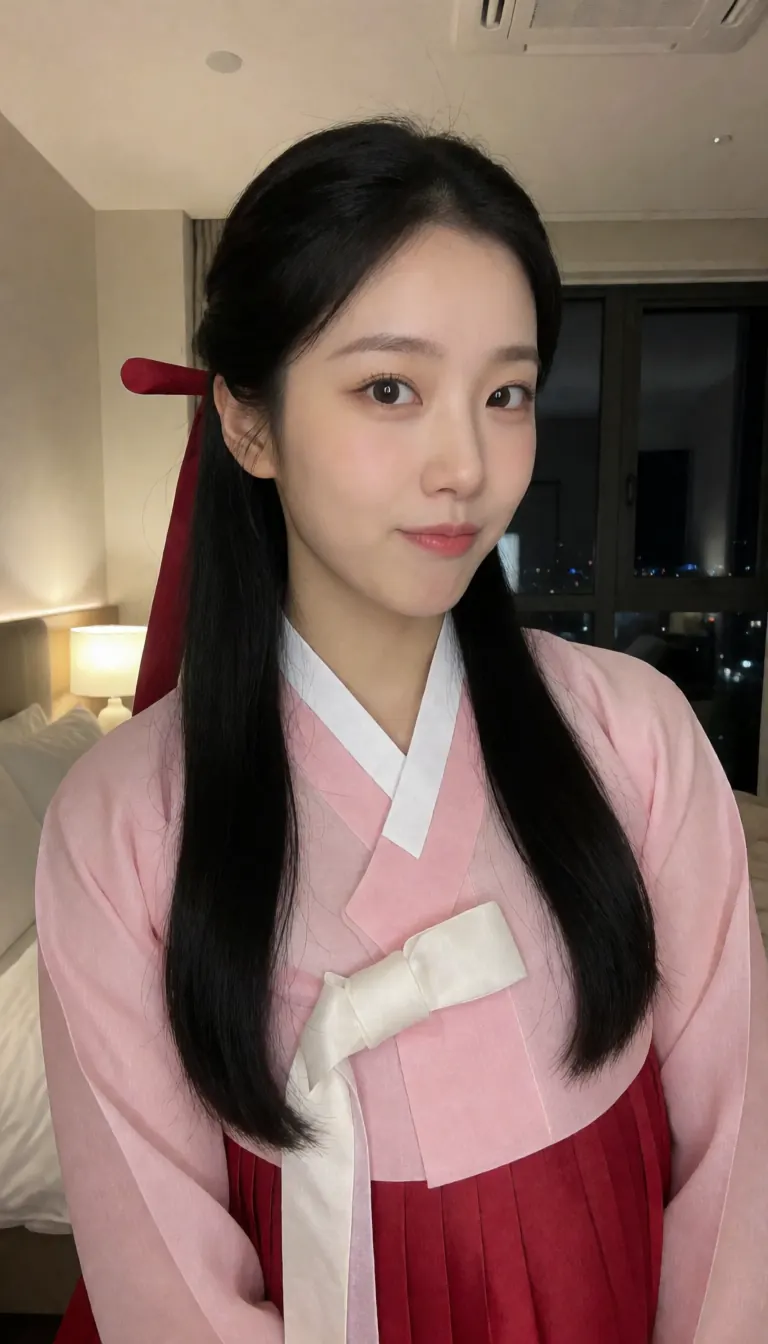
Notice the sample shot above is indoors, not in a courtyard. That’s fine. The background is the least important part of a base image, since later edits replace it anyway. What counts is that the face, the ribbon and the hanbok all came through clearly.
Photo type first
“Candid phone photo” or “candid iPhone photo” at the very start sets the whole tone. It tells the model this is a snapshot, not a studio portrait, and you get natural framing and believable light. “Street snapshot” and “35mm film look” work too if you want a different feel.
A name
Does the model know who Seo-yeon is? No, and it shouldn’t. The name is for you. It makes the prompt read like a description of a person rather than a list of traits, and it gives you something to call her in your files and captions. Pick a fictional name and stick with it.
A specific age
“22-year-old” beats “young”. Specific numbers give the model a narrower target and stop it from drifting between teenager and thirty from one seed to the next. Please keep characters clearly adult, too.
Ethnicity and hair, as precise as you can
Hair is one of the strongest identity cues you’ve got, because it’s big. “Long wavy black hair” is good. “Light brown shoulder-length bob and bangs” is better, since it’s a shape. A distinctive silhouette survives outfit changes, lighting changes and even style changes into anime.
One or two unique marks
This is the slot people skip, and it’s the one that matters most later. A small gold nose stud. A mole above the lip. Freckles. A red hair ribbon. Silver hoop earrings.
Why bother? Marks are a fast drift check: if the ribbon’s gone, look at the face more carefully. And edit models drop small details unless you name them, so you’ll be writing “same nose stud” or “same red ribbon” in every scene prompt. The mark becomes an anchor.
Don’t go overboard. Two marks is plenty.
Skin detail
“Natural skin texture with visible pores”, “light freckles” or “a few freckles”. This is what keeps her looking photographed rather than rendered. Skip “flawless” and “perfect skin”, which push toward plastic. There’s more on this in the Krea 2 Turbo realism guide.
A simple outfit
A cream knit sweater. An oversized grey hoodie. Plain, solid colours. You’ll change the outfit constantly in later edits, so the base outfit doesn’t need to be exciting. It just shouldn’t cover the face or fight for attention.
The exception is a signature outfit, like the hanbok, where the clothes are part of who she is. Then describe it in detail, because it’ll be named again in every edit.
Place, light and camera
Keep the place simple and the light soft. “Soft window light”, “warm lamp light” and “soft daylight” all show skin texture well. Hard shadows across the face get copied into every scene, which you really don’t want.
Do you put products in the base prompt?
If she’s going to hold a product in a video, yes. It’s far more reliable to have it in the base image than to add it later. For Seo-yeon’s ad version, the prompt included “holding a giant pink tub of BERRY GLOW strawberry sugar mask” (BERRY GLOW is a made-up brand).
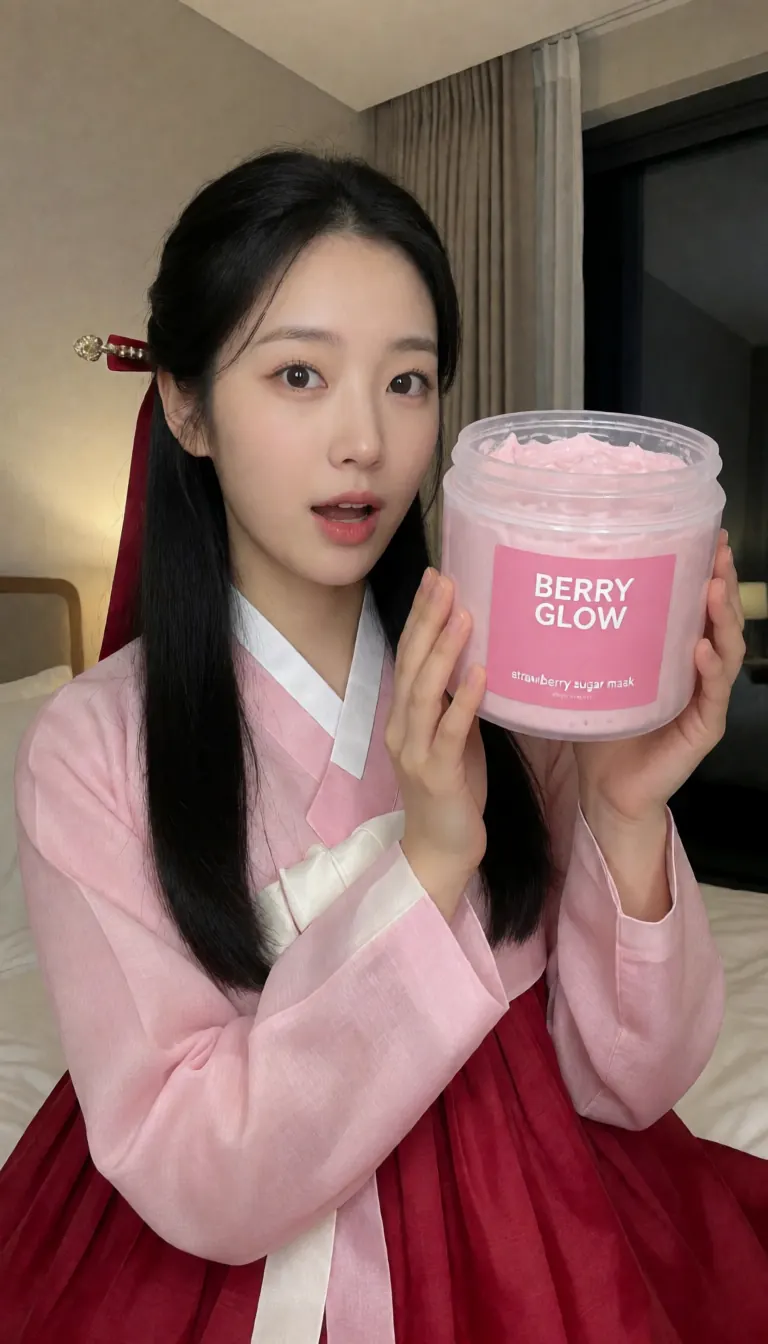
Use fictional brands, or your own, or one that’s hired you. Don’t put another company’s packaging on a character without permission. The UGC product ad guide covers the rest of that workflow.
How do you know the prompt is good?
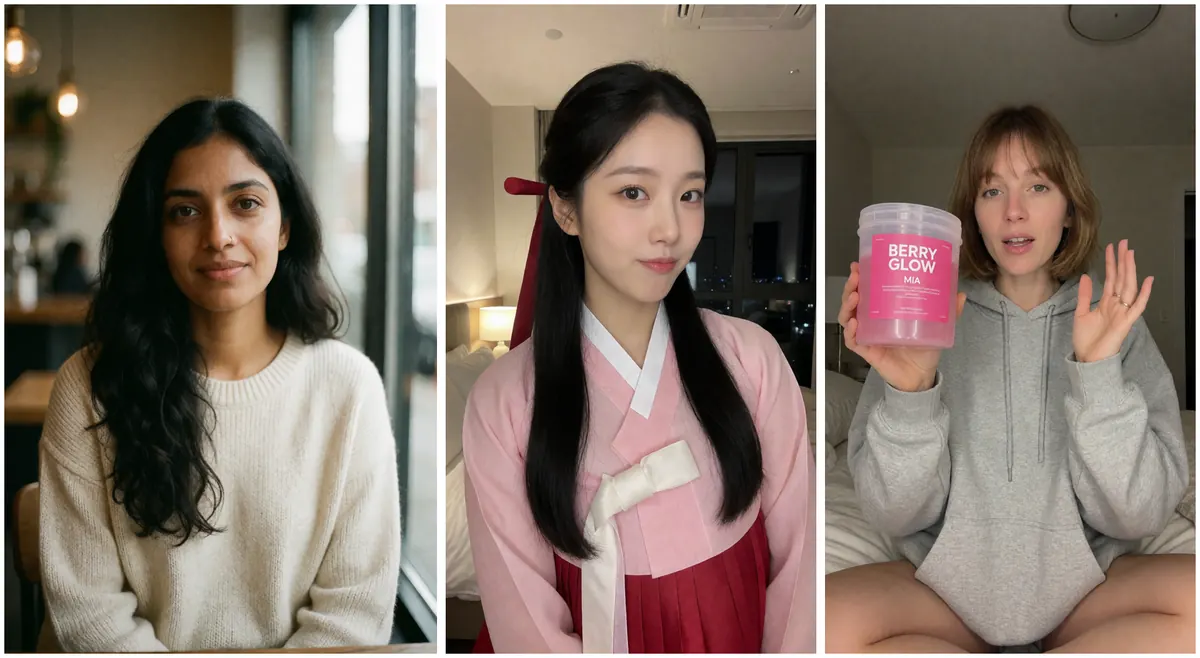
Run it four to six times with random seeds. Then look at the batch and ask yourself a few things:
- Is the face clear, looking near the camera, with nothing covering it?
- Did the unique marks show up?
- Could you describe her in one sentence that wouldn’t fit the other seeds?
- Is she framed waist up or closer? Full-body shots make the face too small to copy well.
If the marks keep disappearing, move them earlier in the prompt. If every seed looks generic, your hair and mark slots are probably too vague. If skin looks waxy, check for leftover “masterpiece” style words.
Then pick one and stop. Don’t keep three favourites. The whole system depends on one master image.
How does the base prompt carry into later edits?
The details you chose become the “keep” list in every edit prompt. The kit’s scene formula for Qwen Image Edit looks like this:
Show the same [woman/man] from the image, same face, same hair and [unique mark],
now [action] [place] [time/light] in [outfit], [camera style], natural skin texture
For Seo-yeon that’s “same face, same hair and same red ribbon”. For Aanya it’s “same nose stud”. You’re reusing the handles you built here. If you’d like the full setup for that step, read the Qwen Image Edit 2511 beginner guide or jump to outfit changes that keep the face.
Does the formula work for men too?
Yes. Facial hair and a chain make good marks. From the kit’s library:
candid phone photo of Arjun, a 27-year-old Indian man with short wavy black hair,
a neat short beard, brown eyes, a thin silver chain, wearing a white t-shirt, in a
bright bathroom, soft window light, natural skin texture with visible pores
Change the name, the age and the marks, and you’ve got a new person. One rule on that: make her up. Don’t describe a real person, a celebrity or someone you know.
The AI Character Kit has 12 character prompts like these plus 52 more for scenes, styles, motion and products, all tested with the workflows. It’s there if you want a head start, but the formula above is honestly most of it.